Tag: Prop Firm

  • The Drawdown Math Every Prop Firm Trader Should Know

    Education · Prop Firm · 10 min read

    Most prop firm challenges are not lost because traders pick bad trades. They are lost because traders do not understand what their drawdown limits actually allow them to do — and they discover the math the hard way, usually three days before passing.

    A 5% daily loss limit and a 10% maximum drawdown sound like reasonable numbers when you read them on the firm’s website. They become much more restrictive once you do the math on what they imply about position size, trade frequency, and recovery from any losing day. Understanding that math before you start the challenge is the difference between passing on the first attempt and grinding through five $99 resets.

    The Core Insight

    Prop firm rules are a constraint optimization problem, not a trading challenge. The trader who passes is not the one with the best edge — it is the one whose position sizing and trade frequency stay mathematically inside the constraints on the worst possible day.

    Two Drawdown Limits, One Trader

    Almost every prop firm imposes two separate drawdown rules — and they interact in ways that catch new traders off guard.

    1. Daily Drawdown

    Usually 4% or 5% of the starting balance. If your equity drops below this threshold during a trading day, the account fails immediately. The clock typically resets at 5pm New York time (FTMO and similar) — meaning your 5% allowance refreshes each new trading day, but it never accumulates.

    2. Maximum Drawdown

    Usually 10% of the starting balance, measured against either the starting balance (static) or the highest equity reached so far (trailing). If your equity ever drops below this floor, the account fails permanently — no daily reset.

    FTMO $100K CHALLENGE EXAMPLE

    Starting balance : $100,000

    Daily loss limit : -$5,000 (5%)

    Max drawdown floor : $90,000 (10%)

    Profit target : +$10,000 (10%)

    Notice the asymmetry that almost no marketing material highlights: you need to make 10% to pass, but you can only lose 10% total to fail. Your reward and risk allowances are exactly equal. That is a much harder mathematical problem than “trade well.”

    The Position Size Trap

    Most challenge accounts blow up not from one catastrophic trade but from a position size that quietly violates the daily limit on a normal-feeling losing day.

    Imagine you decide on 2% risk per trade. That sounds disciplined. On a $100K account, 2% is $2,000 per trade. Sounds fine — well below the $5,000 daily limit. Now ask: how many losing trades in a row can you take?

    2% RISK ON $100K — DAILY MATH

    1 loss : -$2,000 (within limit)

    2 losses : -$4,000 (within limit)

    3 losses : -$6,000 (BREACH — account fails)

    → At 2% risk, three losers in a day = challenge over.

    Three losing trades in a single session is not unusual for any strategy. It is mathematically expected for a 50% win rate to hit a 3-loss streak roughly once every 8 trading sessions. So 2% risk per trade plus normal trade frequency means a guaranteed daily-limit breach within roughly two weeks of trading. Not “if” — “when”.

    The math forces a specific conclusion: to survive a normal losing streak inside the daily limit, your risk per trade must be small enough that 4-5 consecutive losses still keep you safely under 5%. That means risk per trade should typically be 0.75%-1% on a 5% daily limit account. Anything higher and you are gambling with the daily reset.

    The Static vs Trailing Drawdown Trap

    The 10% max drawdown is where most challenges actually die — and the type matters enormously.

    Static Drawdown (Easier)

    The floor stays at $90,000 forever (on a $100K account). You can grow the account to $115K and pull back to $91K — the account survives because you are still above the static floor.

    Trailing Drawdown (Harder)

    The floor moves up with your equity high-water-mark. Reach $115K, and the floor jumps to $105K (i.e., $115K minus $10K). Now a pullback to $104K kills the account — even though you are still in profit overall.

    SAME TRADE, DIFFERENT OUTCOME

    Starting balance : $100,000

    Equity peak : $115,000

    Equity drops to : $104,000

    Static DD floor : $90,000 → SAFE

    Trailing DD floor : $105,000 → ACCOUNT FAILED

    This is why traders running trailing drawdown accounts often pass the challenge but fail the funded account. They use aggressive sizing during the challenge to hit the 10% target fast, then keep the same sizing on the funded account where every winning streak tightens the noose. Trailing drawdown rewards consistency and punishes streaks — even winning streaks.

    Read the Fine Print

    Some firms freeze the trailing drawdown once it reaches the starting balance (e.g., once your trailing floor hits $100K, it stops moving up). Others continue trailing forever. The difference is enormous — find this out before you take the challenge, not after.

    Recovery Math After a Bad Day

    When a losing day takes you near the daily limit, the recovery math gets ugly fast. This is where most traders compound the problem instead of fixing it.

    Imagine you are running a $100K challenge. You hit a -4% day (close to the 5% daily limit but not over). You are now sitting at $96,000. Tomorrow you need to keep building toward the 10% profit target — but you also need to be very careful, because you have less buffer to the 10% max drawdown.

    AFTER A -4% DAY ON $100K

    Current equity : $96,000

    Distance to max DD : $6,000 (only 6% away)

    New daily limit : -$4,800 (5% of fresh equity)

    → One more 5% loss day = challenge dead

    The trader’s instinct is to size up the next day to “make back” yesterday’s loss faster. This is the killing move. Sizing up after a loss day inverts every assumption your survival math was built on. The correct response after a losing day is to size down by 50% for at least the next session, not to size up. The math allows you to recover slowly. It does not allow you to recover fast.

    The Profit Target Math

    A 10% profit target on a 5% daily limit creates a counterintuitive situation: you need to make 10% but you can never have a 10% day. Even if you have an incredible session, you cap out around 4.5% before risk-of-ruin math forces you to stop.

    This means the path to 10% profit looks something like:

    REALISTIC PASS PATH — 30 DAYS

    Average up day : +1.2% (about 50% of days)

    Average down day : -0.8% (about 30% of days)

    Flat days : ~0% (about 20% of days)

    Net per month : ~+12% → comfortable pass

    That is what passing the challenge looks like in practice — small consistent wins, small controlled losses, no hero days. The trader who scores +6% on Tuesday because XAUUSD trended hard might still pass, but they have just halved their remaining error budget for the next four weeks.

    The Time-Of-Day Problem

    Almost every prop firm uses a specific timezone for the daily reset — usually 5pm Eastern Time (US) or midnight CET (European firms). This timezone matters more than most traders realize.

    If your daily reset is 5pm New York and you are trading the London session, your entire trading day might happen on the wrong side of the reset. A trade you opened Monday at 3pm London (10am NY) and held through the New York session and into Tuesday morning London — that trade spans two firm “days.” The opening hours of profit count toward Monday’s daily; the rest count toward Tuesday’s.

    For traders running overnight or multi-session strategies, this means a single losing position can simultaneously eat your Monday daily budget and your Tuesday daily budget. Always know exactly when the reset happens in your local time, and structure your trade timing around it.

    Practical Tip

    FTMO and most US-based firms reset at 5pm New York time. For traders in Bangkok, Singapore, or Sydney, that is roughly 4-7am local — meaning your “trading day” runs essentially aligned with the local Asian session. Plan your max-loss budget per local session, not per calendar day.

    The Survival Position Sizing Formula

    Pulling all of this together, here is the position sizing rule that survives prop firm constraints:

    Risk per trade = (Daily limit × 0.4) / Max trades per day

    Translation: only use 40% of your daily limit budget for actual trade losses (leaving 60% as buffer for spread widening, slippage, partial-close timing, and margin spikes), and divide that across the maximum number of trades you might take in a session.

    For a $100K FTMO account with 5% daily limit and a strategy that might take up to 4 trades per session:

    Daily limit : $5,000

    Buffered budget (40%) : $2,000

    Max trades / day : 4

    Risk per trade : $500 (= 0.5%)

    0.5% risk per trade feels conservative on a normal account. On a prop firm challenge, it is the size that allows you to take 4 consecutive losses, still be within the daily limit, and still have buffer for the next session. That is the survival sizing.

    Automating the Constraints

    All of this math is correct only if you actually enforce it during live trading. Most challenge failures are not failures of math — they are failures of discipline at minute 47 of a frustrating session. The trader knows the rule. They just stop following it when the market makes them angry.

    The fix is to make the constraints structural rather than psychological. A trade management EA that knows your daily limit, tracks accumulated losses across the day, and refuses to let you place a trade once you are within X dollars of breaching — that is what removes the human failure mode. The math is enforced by the platform, not by your willpower at the wrong moment.

    RiskFlow Pro includes daily drawdown protection that does exactly this — set your daily loss limit (matched to your prop firm’s rules), and the EA will block new trade entries once accumulated daily loss reaches the threshold. Combined with automated position sizing from your risk %, the platform makes the survival math impossible to violate, even when you forget you set it.

    For prop firm specific setup — daily reset timezone configuration, the four risk modes that match different challenge structures, partial close strategies that pair well with tight daily limits — the Advanced Features guide walks through the FTMO section in detail, including how to handle the CET vs NY reset cleanly so your daily budget aligns with your actual trading session.

    Key Takeaways

    • Prop firm challenges are constraint optimization problems — the trader who passes is the one whose math survives the worst possible day.
    • Daily and max drawdown interact: at 2% risk per trade, three losers in a session breaches the daily limit.
    • Trailing drawdown punishes winning streaks as much as losing ones — know your firm’s rule before starting.
    • The correct response to a losing day is to size down by 50%, not size up to “recover.”
    • Realistic pass path: ~1.2% average up day, ~-0.8% average down day, no hero sessions.
    • Survival sizing formula: (Daily limit × 0.4) / Max trades per day. On 5% daily / 4 trades, that is 0.5% risk per trade.
    • Automate the daily limit enforcement — willpower fails at minute 47.

    Get RiskFlow Pro

    Pass the challenge by making the rules unbreakable.

    Daily drawdown protection, prop-firm-aware reset timing, automated position sizing — built for FTMO, MyForexFunds, and similar challenges.

    Download Free on MQL5 →

    For the FTMO-specific setup walkthrough, see the Advanced Features Guide.
  • Fixed % vs Fixed $ Risk — Which Actually Works?

    Education · Risk Management · 9 min read

    Open any trading book and the advice on position sizing splits into two camps. Camp one says “risk a fixed percentage of your account on every trade”. Camp two says “risk a fixed dollar amount”. Both have advocates with track records. Both sound reasonable. But under different account conditions, one of them will quietly destroy you while the other lets you compound.

    The right answer is not “always pick one.” The right answer is knowing which method matches your account size, your strategy, and the phase of your trading career you are in.

    The Short Answer

    Fixed % is mathematically superior for compounding accounts above $10k. Fixed $ is more practical for very small accounts and for prop firm challenges with strict daily loss caps. Most traders should use fixed % with a hard dollar ceiling — the best of both worlds.

    How Each Method Actually Works

    Before debating which is better, let us define exactly what each one does on a real trade.

    Fixed Percentage Risk

    You decide on a percent of your account to risk per trade — say 1%. The actual dollar risk recalculates with every change in account balance. After winners, your dollar risk grows. After losers, it shrinks.

    Account: $10,000 · 1% risk = $100 per trade

    Account grows to $15,000 · 1% risk = $150 per trade

    Account drops to $8,000 · 1% risk = $80 per trade

    Fixed Dollar Risk

    You decide on an exact dollar amount to risk per trade — say $100 — and you keep that amount constant regardless of what happens to the account.

    Account: $10,000 · fixed $100 = 1.0% risk

    Account grows to $15,000 · fixed $100 = 0.67% risk

    Account drops to $8,000 · fixed $100 = 1.25% risk

    Notice the asymmetry: with fixed $, your effective risk percentage grows when the account shrinks. This is the core danger of fixed dollar sizing — and the core advantage of fixed percentage sizing.

    The Compounding Argument for Fixed %

    Fixed % wins the math contest hands down. Imagine two traders with $10,000 accounts, both running a strategy that produces 100 trades per year with a 60% win rate and 1:1 R:R. Both risk $100 per trade in absolute terms at the start of year one.

    After year one, both accounts are at $12,000 (60 wins minus 40 losses, net +$2,000). Now what happens in year two?

    YEAR 2 — STARTING AT $12,000

    Trader A (1% fixed) → risks $120/trade → ends year at $14,400

    Trader B ($100 fixed) → risks $100/trade → ends year at $14,000

    A 2.8% advantage in year two. Repeat this for ten years and Trader A is significantly ahead — not because their strategy is better, but because their risk grew with their winnings. Compounding only works if your bet size scales with your bankroll.

    The opposite case is more painful. If both traders have a bad year and end down at $8,000, Trader A automatically risks less ($80/trade) for year two — which protects them. Trader B keeps risking $100/trade, which is now 1.25% of a smaller account. If the bad year continues, Trader B accelerates toward zero while Trader A decelerates.

    When Fixed Dollar Actually Wins

    If fixed % is mathematically dominant, why does anyone still use fixed $? Because in three specific situations it is genuinely the better choice.

    1. Very Small Accounts

    On a $500 account, 1% risk is $5. Many brokers have minimum lot sizes that make $5 risk impossible to achieve precisely — you end up either over-risking (the next-step-up lot size risks $8 or $12) or unable to take the trade at all. Fixed dollar sizing lets you set a workable risk amount that matches what your broker will actually accept.

    2. Prop Firm Challenges with Daily Loss Caps

    Most prop firms (FTMO, MyForexFunds, etc.) impose a hard daily loss limit — often 4% or 5% of starting balance. With fixed % sizing, your dollar risk per trade compounds along with profits during a winning streak inside the day, which can push you over the daily cap faster than expected. Fixed dollar sizing keeps your daily exposure mathematically capped: 4 trades at $200 risk = $800 max daily loss, locked.

    3. Strategies with Variable Win Quality

    If your strategy has clearly defined “A-grade” and “B-grade” setups (think: trades meeting all your criteria vs trades meeting most), fixed dollar sizing per grade is cleaner than constantly recalculating percentages. You might risk $200 on every A-setup and $100 on every B-setup, regardless of account size. This makes performance review much easier — you can immediately see which grade is actually profitable.

    Reality Check

    Fixed dollar is also psychologically easier when the account is in drawdown. It is harder to take a trade when “1% of my account” keeps getting smaller and feels like surrender. A constant dollar amount feels more like business-as-usual.

    The Hybrid Approach Most Traders Should Use

    In practice, the smartest setup combines both. Here is the rule that experienced traders converge on after a few years:

    Risk = MIN(account x 1%, fixed $ ceiling)

    Translation: risk 1% of your account per trade, but never more than a hard dollar ceiling you set in advance. For example: 1% of account, capped at $500 per trade.

    Why this works:

    • Below the ceiling, you get the compounding benefit of fixed % — your risk grows with the account, your wins grow proportionally.
    • Above the ceiling, your absolute dollar risk stops growing. This protects you from a single trade becoming psychologically too large to manage rationally — a real problem once accounts cross six figures.
    • In drawdown, fixed % automatically reduces your absolute risk — so you decelerate naturally when things go wrong.

    Most traders start with pure fixed % (1% or 0.5%) and add the dollar ceiling later when their account grows large enough that risking the full % per trade starts feeling uncomfortable.

    The Mistake That Kills Both Methods

    Whether you use fixed % or fixed $, both methods break the moment you start trading instruments where your lot size calculation is silently wrong.

    A trader can set their system to “1% per trade” and feel disciplined. But if they switch from EURUSD to gold and apply the same lot size mental math, they may actually be risking 5% or 10% — and they will not notice until the equity curve confirms it. The same problem hits fixed dollar traders: “I always risk $100” sounds disciplined, but if your gold trade is actually risking $700 because the tick value math went wrong, the discipline is illusion.

    This is why both methods only work when paired with automated lot calculation that reads the instrument’s real Tick Size and Tick Value. Without that, you are picking between two methods that will both lie to you about how much you are actually risking.

    Common Trap

    Switching between fixed % and fixed $ midway through a losing streak. This is almost always emotional, not strategic — traders move to fixed $ during drawdowns to “stop the bleeding from getting smaller” and then back to fixed % during recoveries. Pick one method, write it down, and only change it after a 100-trade review — never mid-streak.

    Choosing What Fits Your Account Today

    A practical decision tree for traders who want a clear answer right now:

    • Account under $1,000: Fixed dollar — broker lot minimums make % sizing impractical.
    • Account $1,000-$10,000: Fixed % at 0.5%-1% — small enough to compound meaningfully, large enough to absorb a 10-trade losing streak.
    • Account $10,000-$100,000: Fixed % at 1% — this is the sweet spot where compounding compounds and drawdown protection kicks in automatically.
    • Account above $100,000: Fixed % with dollar ceiling — set the ceiling at whatever absolute loss feels manageable per trade.
    • Prop firm challenges: Fixed dollar at the level that keeps your worst-day-loss safely below the daily cap, regardless of how many trades you take.

    Making the Method Match the Math

    Whichever method you pick, the calculation needs to happen automatically before every single trade. Manual recalculation is where the system breaks — markets move fast, you skip a step, and the next thing you know your “1%” trade is actually risking 4% because you eyeballed the lot size.

    A proper trading dashboard handles this in real time: you set your method (% or $), enter your stop loss, and the platform reads the instrument’s real Tick Value to calculate the correct lot size instantly. No mental gymnastics, no broker-specific lookup tables, no silent over-risking on gold and indices.

    RiskFlow Pro supports four risk modes — % Balance, % Equity, Fixed $, and % Free Margin — and switches between them with one click. Whichever method you decide fits your account today, you can run it without recalculating anything by hand.

    For a deeper look at the four risk modes, the daily drawdown protection, and the multi-level partial close that pairs naturally with fixed % sizing, the Advanced Features guide walks through each setting in detail with real examples — especially useful if you are running prop firm challenges where the choice between % and $ sizing has direct rule-compliance implications.

    Key Takeaways

    • Fixed % wins the long-term compounding contest — your bet size scales with the bankroll, both up and down.
    • Fixed $ wins for very small accounts, prop firm challenges with daily caps, and graded-setup strategies.
    • The hybrid “fixed % capped at a dollar ceiling” gives most traders the best of both above $50k.
    • Both methods break silently when applied to instruments where lot sizing math is wrong — gold, oil, indices, CFDs.
    • Never switch methods mid-streak. Lock the choice in writing and review only every 100 trades.

    Get RiskFlow Pro

    Switch between four risk modes with one click.

    % Balance, % Equity, Fixed $, % Free Margin — all calculated correctly on any instrument, any broker.

    Download Free on MQL5 →

    For prop firm setups and the four risk modes in detail, see the Advanced Features Guide.

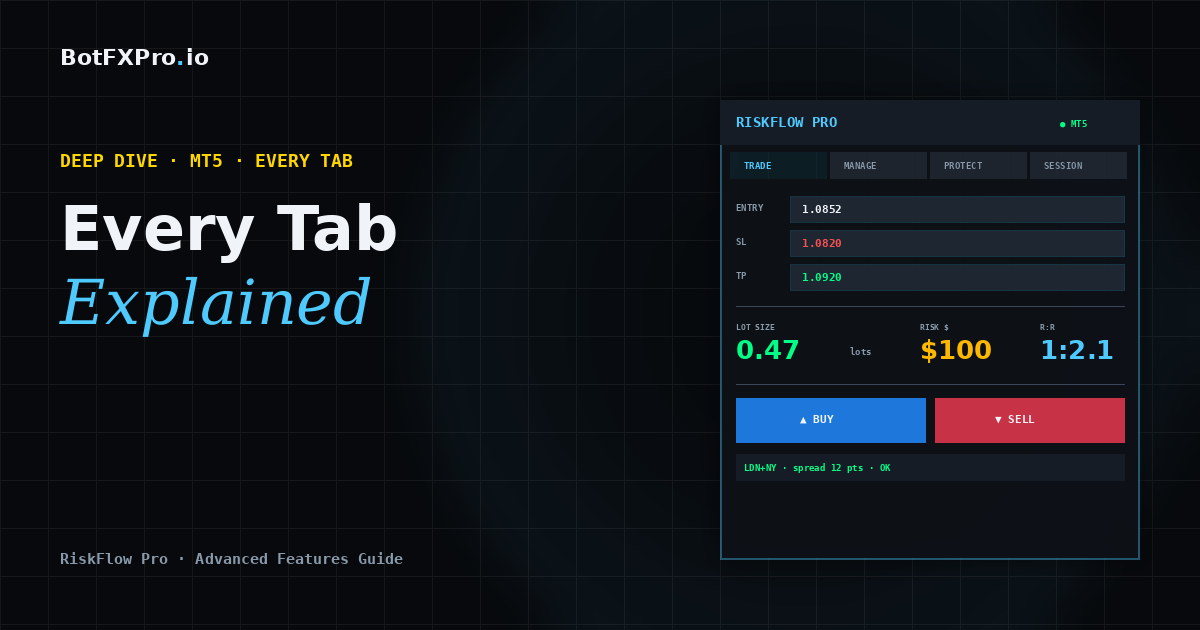
  • RiskFlow Pro Advanced Features: Every Tab Explained with Real Trading Examples

    RiskFlow Pro Advanced Features: Every Tab Explained with Real Trading Examples

    Advanced Guide · MT5 · Deep Dive · 15 min read

    You have RiskFlow Pro attached to your chart and you know how to size a trade and place it. Now you want to go deeper. This guide walks through every tab, every feature, and exactly when each one earns its keep in real trading.

    If you have not installed RiskFlow Pro yet or you are still getting your first trade placed, start with the Quick Start Guide first — it gets you from zero to your first trade in under 5 minutes, then come back here.

    What You Will Learn

    The four trailing stop modes, partial close triggers, split-entry strategies, OCO pending orders, virtual SL/TP stealth mode, the complete Protect tab for prop firm challenges, multi-symbol monitoring, hotkeys, and the trade journal. Everything with concrete examples you can copy.

    Manage Tab — The Heart of RiskFlow Pro

    This is where most of your edge comes from. The Manage tab turns you from a trader who places orders into a trader who systematically manages them.

    Breakeven — The One You Should Always Use

    You already know this one from the Quick Start guide. Toggle BE ON, set Trigger R to 1.0, set Offset pips to 2.0. That is 90% of traders sorted.

    Pro tip: for scalping (trades that last minutes), drop Trigger R to 0.5. For swing trades (trades that last days), bump it up to 1.5 to give the trade room to breathe before locking in.

    Partial Close — Bank Profit While Letting Winners Run

    The setup: Partial Close triggers at a specific R multiple and closes a percentage of your position. The field value is R multiples, not a percentage.

    Typical setup that works well for most strategies:

    • Close at R: 1.0 — closes at 1R profit
    • Close %: 50 — takes half off the table

    Pair this with Breakeven and something magical happens: when price hits 1R, you bank 50% profit AND your SL moves to entry. The remaining 50% of the position is now a risk-free runner heading toward your TP. This is the single highest-edge combo in retail trading.

    Trailing Stops — Four Modes, Know When to Use Which

    RiskFlow Pro offers four trailing methods. Cycle through them using the Trail Mode button.

    1. ATR Trailing — Uses Average True Range to set a dynamic distance from current price. Best for trending markets where volatility varies. Settings: Period 14, Multiplier 2.0-2.5. Tighter multipliers lock in faster but get stopped out on normal retracements.

    2. Pips Trailing — Fixed distance in pips. Best when you know the instrument’s typical retracement depth. For gold scalping, try 150250 pips. For EURUSD intraday, 2030 pips.

    3. Percent Trailing — Trails at a % distance from entry. Best for long-term holds where you want the stop to scale with the move.

    4. MA Trailing — Uses a moving average as the trailing stop line. Best for trend-following where you want to stay in as long as price is above/below MA. Cycle through period options: 20, 50, 100, 200.

    Common Mistake

    Do not enable Breakeven AND Trailing at the same time. They fight each other. Use Breakeven only, OR Trailing only. For most traders, Breakeven + Partial Close is the strongest combo.

    Split Entry — Distribute Risk Across Multiple Positions

    Set Split to 2 through 5. Your calculated lot size is divided across that many positions, all sharing the same SL and TP.

    Why bother? Two reasons. First, it lets you scale out at multiple TPs manually (close position 1 at 1R, position 2 at 2R, let position 3 run). Second, some brokers give better fills on smaller lot sizes. On prop firm accounts, this can also help with position size limits.

    Protect Tab — Prop Firm Lifesaver

    If you are running an FTMO challenge, MyForexFunds, The Funded Trader, or any other prop firm evaluation, this tab is what keeps you in the challenge instead of violating drawdown rules.

    Daily DD Limit

    Cycle through four DD calculation methods via the DD Type button:

    • FTMO Rel — FTMO’s relative method (balance at 00:00 CE(S)T). Use this for FTMO.
    • FTMO Abs — Absolute drawdown from starting balance.
    • % Balance — Generic percentage of current balance.
    • % Equity — Generic percentage of current equity.

    For FTMO specifically, enter 4.5 instead of exactly 5.0. That 0.5% buffer protects you from slippage, spread widening, and timing mismatches between your broker time and CE(S)T.

    Floor Line on Chart

    When Daily DD Limit is ON, RiskFlow Pro draws a horizontal line on your chart showing the exact equity level where your daily limit triggers. Psychologically, seeing this line is huge — it stops you from overtrading because you can see exactly how much room you have left.

    Max Spread & Slippage

    Two protection settings below the DD limit:

    • Max Spread — Blocks new orders when spread is above this value in points. Set to 30 for most majors, 50-100 for gold.
    • Max Slippage — Rejects orders that slip beyond this many points. Protects you during news events.

    Want push or email alerts when the daily DD limit triggers, a Partial Close fires, or your Stop Loss moves to breakeven? The MT5 notifications setup guide walks through the full configuration — push to your phone, email via SMTP, and which events are worth turning on.

    Pending Orders — OCO and Trailing Entries

    Place a pending order the usual way (entry price not at market), and RiskFlow Pro shows extra options.

    OCO (One Cancels the Other)

    Toggle OCO ON before placing two opposing pendings (e.g., Buy Stop above and Sell Stop below a range). When one triggers, the other is automatically cancelled. Perfect for breakout trading when you do not know direction but will trade the break either way.

    Pending Trailing

    Turns your pending order into a chase. As price moves in the direction of your pending entry, the pending order moves with it at a fixed distance. Useful when you want to catch a pullback entry but the price keeps trending. Set Trail Points to match typical retracement depth.

    Virtual SL/TP — Stealth Mode

    Toggle Virtual SL/TP ON. The SL and TP are tracked by the EA locally and sent as market orders when triggered, instead of sitting on the broker’s server. Benefits:

    • Brokers cannot see your stops (protects against stop hunting on some brokers)
    • Works around broker SL distance restrictions
    • Reduces “stop hunt” style false triggers from spike candles

    Important

    Virtual SL/TP only works while MT5 is running. If your VPS or MT5 terminal closes, there is no safety net. Use real SL/TP on your broker account as the master, and Virtual only as a secondary layer.

    Session Tab — Trade Only When Your Edge Exists

    Every instrument has hours when it moves and hours when it chops. Session filter blocks new trades outside your defined windows.

    The tab shows four preset sessions: Sydney, Tokyo, London, New York. You can customize each one’s open and close time in GMT. Toggle Session Filter ON and only the sessions you enable will allow new orders.

    Recommended filters by instrument:

    • Gold (XAUUSD): London + New York — the overlap (13:00-16:00 GMT) is the highest-edge window
    • EURUSD: London + NY open — avoid Asian session chop
    • USDJPY: Tokyo + London — avoid thin NY afternoon
    • US30 / Nasdaq: NY only — the indices barely move outside US hours

    Monitor — Track Positions Across All Charts

    Press the MON button (or hotkey M) to open the multi-symbol monitor window. You will see every open position RiskFlow Pro manages across all your charts — not just the current one.

    For each position: symbol, direction, lots, entry, current P&L, and time open. You can close any position directly from the Monitor without switching charts. If you trade 3-5 instruments simultaneously, this saves you serious clicking.

    Journal Tab — Your Trading History, Automated

    The Journal tab logs every trade RiskFlow Pro places: entry, exit, R multiple, duration, and your optional notes. No more manually tracking trades in a spreadsheet.

    Two things to do regularly:

    1. Export to CSV weekly. Click the Export button on the Journal tab. Open in Excel or Google Sheets and filter by R multiple. Your biggest insights come from seeing which setups actually hit 2R+ vs which ones chop around 0.5R.
    2. Add notes in the Trade tab before pressing BUY/SELL. Even a 3-word tag like “NY open pullback” gives you filterable categories for review later.

    Hotkeys — Trade Without Clicking

    Click the chart once to give it focus, then:

    • B — Buy (uses current SL/TP from dashboard)
    • S — Sell
    • X — Close all positions on this symbol
    • C — Calculate (recalc lot size from current SL)
    • L — Toggle Lines mode (draggable Entry/SL/TP)
    • M — Toggle Monitor window

    Once you get used to Lines mode + hotkeys, your workflow becomes: drag SL line to where you want risk, drag TP line to target, glance at lot size on dashboard, press B or S. Entire trade entry in under 3 seconds.

    Settings Tab — One-Time Configuration

    You set this up once and forget it. Worth reviewing anyway:

    • Risk Type — % Balance is the most common. % Equity adjusts as you rack up floating profit. Fixed $ locks risk to a dollar amount regardless of balance changes.
    • Value — Most retail traders should sit at 0.5-1% per trade. Above 2% starts compounding losses dangerously fast.
    • R:R Ratio — 2.0 is the default. Higher if your strategy has low win rate (breakouts), lower if high win rate (mean reversion).
    • Server time bar — Shows broker time (with UTC offset) and CE(S)T time. Critical for FTMO since DD resets at CE(S)T midnight, not your broker’s midnight.

    Putting It All Together — Three Real Setups

    Setup 1: FTMO Gold Scalper

    • Risk Type: % Balance, Value: 0.5%
    • R:R: 2.0
    • Manage: Breakeven ON (Trigger 1R, Offset 5 pips), Partial Close ON (Close at 1R, Close 50%)
    • Protect: Daily DD ON, Type FTMO Rel, Limit 4.5%, Max Spread 50 pts
    • Session: London + NY only

    Setup 2: Swing EURUSD Breakout

    • Risk Type: % Balance, Value: 1.0%
    • R:R: 3.0
    • Pending orders: OCO ON (Buy Stop above resistance, Sell Stop below support)
    • Manage: ATR Trailing ON (Period 14, Mult 2.5), Breakeven OFF
    • Session: filter OFF (swing trades span sessions)

    Setup 3: Multi-Instrument Trend Follower

    • Risk Type: % Equity, Value: 0.75%
    • R:R: leave blank, manage exit manually
    • Manage: MA Trailing ON (MA 50), Breakeven OFF
    • Split Entry: 3 (distribute across three positions)
    • Monitor: always on, so you can close any position from any chart

    A Final Note on Discipline

    RiskFlow Pro is a tool, not a strategy. It cannot tell you when to trade or which direction. What it does is remove the excuses: “I forgot to move my stop,” “I took too much risk,” “I kept trading after hitting my daily limit.” Those excuses are what kill most traders. Setting up RiskFlow Pro correctly is setting up a system where those excuses are impossible.

    Pick one of the three setups above that matches your style, dial in the settings once, and let the EA do its job for a month. Then export your journal to CSV and review. The data will tell you which parts of your trading need work.

    Get RiskFlow Pro

    Free for the First 500 Downloads

    Every feature in this guide, in one compact dashboard on your MT5 chart. Position sizing, trade management, prop firm protection, and a built-in journal.

    Download Free on MQL5 →

    Works on any MT5 broker account · No registration on our site required

    New to RiskFlow Pro? Start with the Quick Start Guide — get your first trade placed in under 5 minutes, then come back here for the deep dive.

    Questions or requests for new features? Leave a comment on the MQL5 product page — that is where I actually read and respond.